Overview: Working With The Interview List
The Overview section (Overview) is the central dashboard for viewing, searching, and managing all interviews related to your organization.
Two interview types are displayed here:
- Self-Assessment interviews are completed by the candidate independently, without recruiter participation, by answering questions orally. The system checks the answers automatically.
- Recruiter-led interviews (P2P) are conducted as live video meetings between the recruiter and the candidate.
In this section, you can track completion statuses, review AI-generated results, and quickly access the details of each interview.
How To Open The Overview Section
- After signing in, find the sidebar navigation on the left.
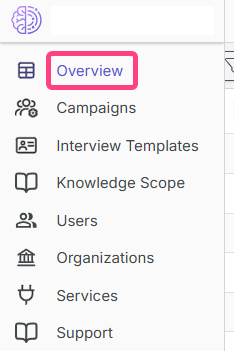
- In the list of sections, select the first item, Overview.
- Click it with the left mouse button.
Overview Page Interface
The page consists of several key elements.
1. Toolbar
The toolbar is located at the top of the page and contains buttons for interview-related actions.

| Button | Purpose |
|---|---|
| Edit selected record | Opens the detailed interview card. The button is active when a row is selected in the table. |
| Edit in new window | Opens interview details in a separate browser tab. |
| Copy link | Copies a direct link to the selected interview to the clipboard. |
| Delete selected record | Deletes one or more selected interviews. |
| Show/Hide filters | Opens or hides the advanced search panel. |
| Reset filters | Clears all applied filtering conditions. |
| Select all / Clear selection | Selects or clears all rows on the page. |
| Refresh data | Refreshes the table and updates statuses and results. |
2. Interview Table
The central part of the page is occupied by the interview table. Each row corresponds to a single interview.

Main table columns:
| Column | Description |
|---|---|
| Recruiter name | Shows who conducted the interview. Relevant for the P2P format. |
| Candidate name / Email | Candidate contact details. |
| Specialization / Template / Campaign | Main interview parameters. |
| Status | Current interview status, for example Scheduled, In progress, Completed, or Under review. |
| Level / Recruiter score | Preliminary interview results. |
| Tasks / Questions | Completion progress: completed / total. |
| Cheating | If the AI system detects signs of cheating, a red indicator is displayed here. On hover, you can see details such as Audio cheating score: 55%, Text cheating score: 37%. |
How To Use Filters
Filters help you quickly find the required interviews among a large number of records.
- Click Show filters in the toolbar.
- A filtering panel with fields will appear below the toolbar.
- Use the relevant search fields. Filters are usually available for almost all table columns:
- Recruiter name.
- Candidate name / Candidate email.
- Interview type such as Self-Assessment or P2P.
- Template.
- Specialization.
- Status.
- Campaign.
- Level or score.
- And other parameters.
Search examples:
| If you need to | What to do |
|---|---|
| Find all interviews for a specific candidate | Enter the name or email in the Candidate name / Candidate email field. |
| Find all completed Self-Assessment interviews | In the Type field, select self-assessment, and in the Status field, select Completed. |
| Find all interviews within a specific campaign | Enter the campaign name in the Campaign field. |
| Find interviews with suspected cheating | Pay attention to the red icons in the Cheating column. |
To apply a filter, enter or select a value in the required field. To clear all conditions, click Reset filters.
Viewing Interview Details
Quick view:
- Double-click any row in the table.
- Or select a row and click Edit selected record in the toolbar.
After that, a page with detailed interview information will open. Depending on the interview type and status, the interface may vary slightly, but it usually contains the following tabs:
| Tab | Description |
|---|---|
| General information | Candidate data, interview date, status, and duration. |
| Technical questions | List of questions, candidate answers, AI scores, and evaluation criteria. |
| Transcript | Full text transcription of the video interview. |
| Language | Spoken language level evaluation, if it is a language test. |
| Cheating score (anti-cheating) | For Self-Assessment: a comprehensive fairness analysis including tab switching and speech-pattern analysis. |